TRShell Get early access

Built by experts to hunt vulnerabilities

A terminal with an agent in it.

An agent that does the work of a full engagement. TRShell plans the job, runs it in your real terminal and browser, hands parts to scoped subagents, and writes up what it finds. Every command stays in the open.

Used by individuals on bug bounties and security audits.

Debian-based Linux (.deb) · bring your own models, including local ones

Works with
  • Anthropic
  • OpenAI-compatible
  • Google
  • AWS Bedrock
  • Ollama (local)

The difference

Output is cheap. Reading it is the work.

This is what a scan prints. Move the light across it to see what TRShell pulled out of the same lines: what matters, how bad it is, and the evidence it kept. The target is fictional.

Raw scan output, as the terminal printed it

$ nmap -sV -p- --open staging.acme.test
Starting Nmap 7.95 ( https://nmap.org )
Nmap scan report for staging.acme.test
Host is up (0.031s latency).
Not shown: 65531 closed tcp ports (reset)
PORT STATE SERVICE VERSION
22/tcp open ssh OpenSSH 9.6p1
80/tcp open http nginx 1.24.0
443/tcp open ssl/http nginx 1.24.0
8080/tcp open http Jetty 9.4.31.v20200723
$ curl -skI https://staging.acme.test:8080/.git/HEAD
HTTP/1.1 200 OK
Server: Jetty(9.4.31.v20200723)
Content-Length: 23
$

The same output, as the agent read it

$ nmap -sV -p- --open staging.acme.test
Starting Nmap 7.95 ( https://nmap.org )
Nmap scan report for staging.acme.test
Host is up (0.031s latency).
Not shown: 65531 closed tcp ports (reset)
PORT STATE SERVICE VERSION
22/tcp open ssh OpenSSH 9.6p1
80/tcp open http nginx 1.24.0
443/tcp open ssl/http nginx 1.24.0
8080/tcp open http Jetty 9.4.31.v20200723Low · outdated Jetty
$ curl -skI https://staging.acme.test:8080/.git/HEAD
HTTP/1.1 200 OKMedium · .git exposed
Server: Jetty(9.4.31.v20200723)
Content-Length: 23evidence saved
findings_add2 logged
target_notes_addsaved

What it does

An operator's console, not a black box.

Every capability below is the real product. The target in these screens is fictional.

It thinks.

A plan before it acts. A model for every role.

Every task opens with a step-by-step plan, a feasibility score and a TODO list seeded from it. Planner, executor, debugger and critic can each run on a different model, and a role falls back to your chat model if its own is unavailable.
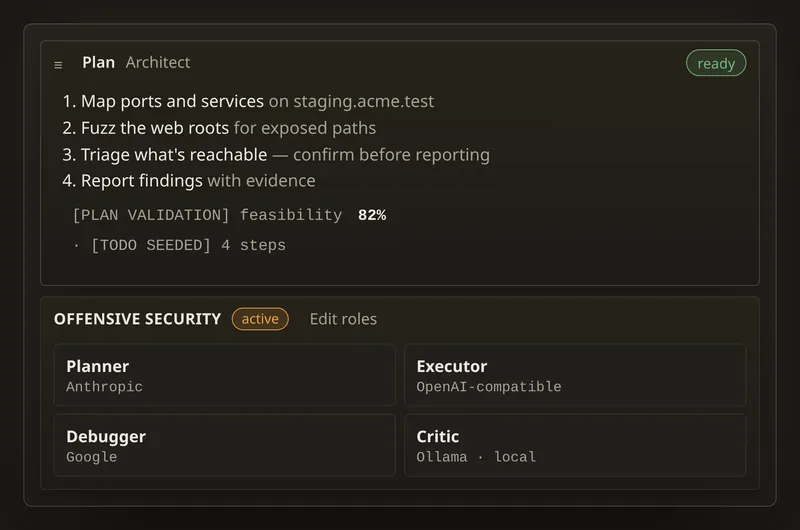
A plan card with four steps and an 82% feasibility score, above a profile that binds the planner, executor, debugger and critic roles to Anthropic, OpenAI-compatible, Google and Ollama.

It works.

Your real terminal. Every command in the open.

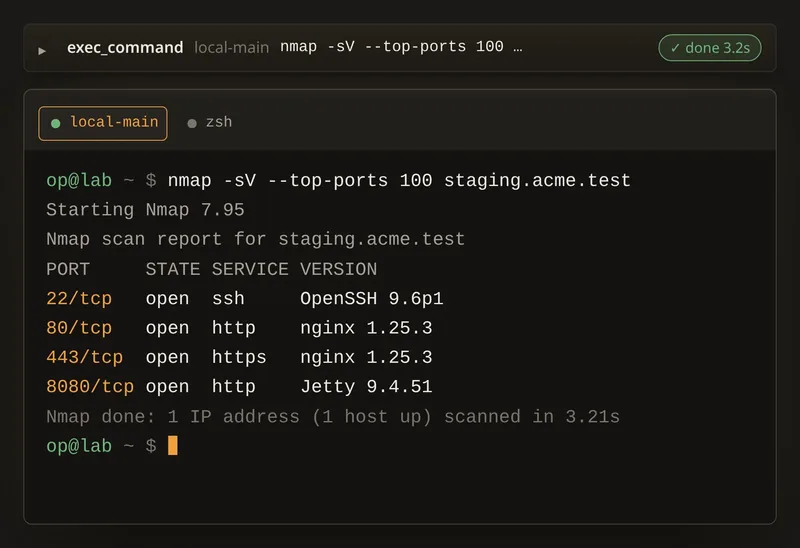
The agent works in the same local and SSH tabs you use, so you see exactly what it ran. Tool cards stream output while a command is still running; nothing happens behind your back.

An exec_command card marked done above a terminal tab named local-main, where the agent ran nmap against staging.acme.test and four open ports are listed.
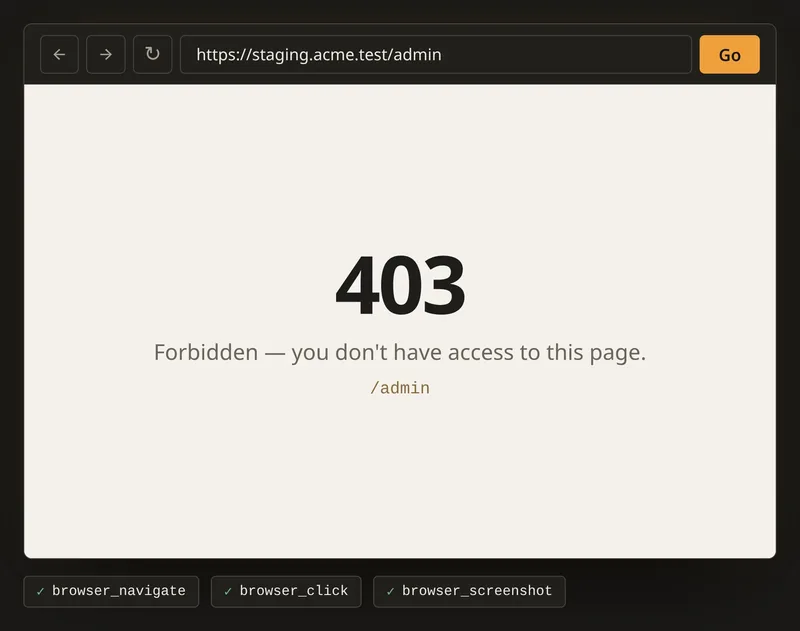
The built-in browser showing a 403 Forbidden page for /admin, with browser_navigate, browser_click and browser_screenshot tool calls below it.

It drives a real browser.

Navigate, click, type, read pages, take screenshots and check the console — in a built-in browser you can watch.

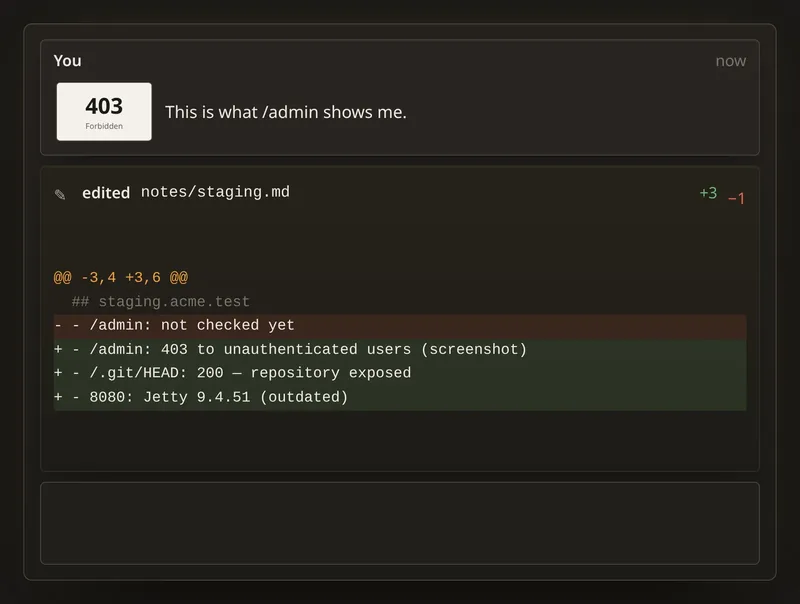
A message with an attached screenshot of a 403 page, and an edited notes file whose diff adds three lines and removes one.

Paste a screenshot. Watch every edit live.

Drop an image into the chat. File edits and diffs appear while they're being written, not after.

It delegates.

Subagents on their own limits.

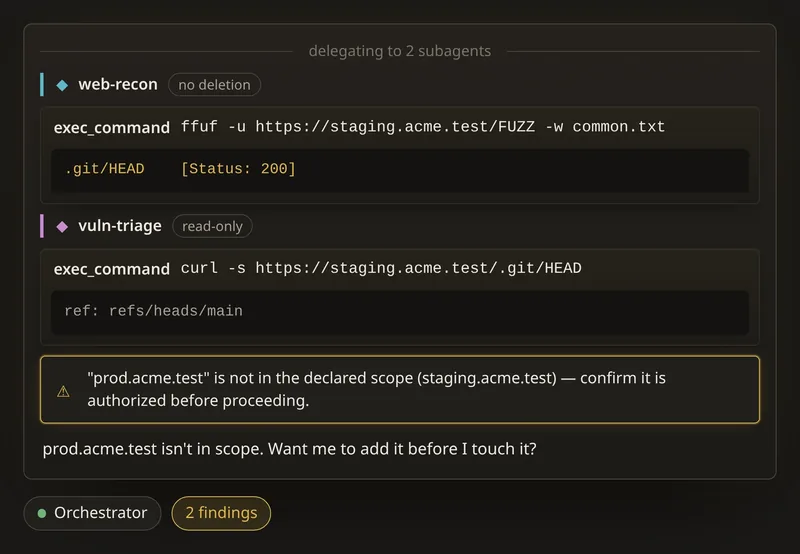
The main agent hands parts of a job to subagent profiles you define. Each gets its own lane in the chat and its own shell access — unrestricted, no deletion, or read-only. Declare your scope, and it warns you before a command reaches outside it.

Two subagent lanes, web-recon with no-deletion access and vuln-triage with read-only access, followed by a warning that prod.acme.test is not in the declared scope.

It recovers.

When a command fails, it works out why.

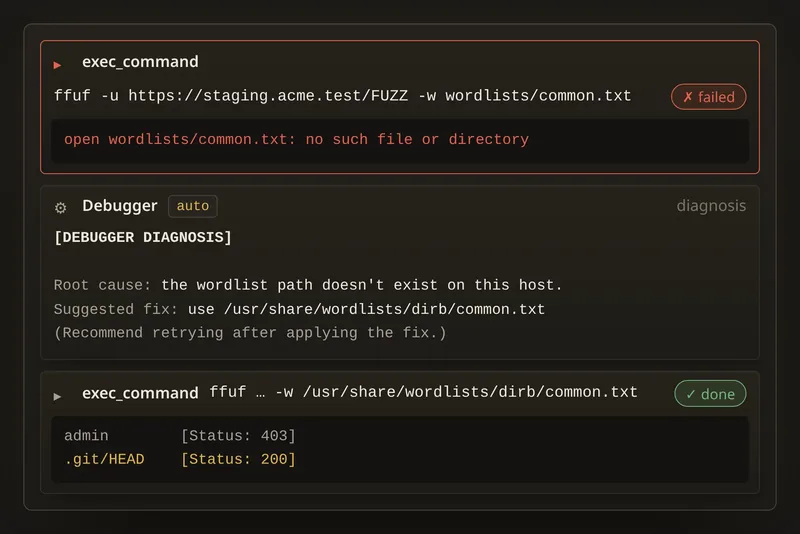
A debugger role diagnoses the failure — root cause and a suggested fix — and the agent retries with it applied. It also notices when it's stuck repeating itself and breaks out of the loop.

A failed ffuf command with a missing wordlist, a debugger diagnosis naming the root cause and fix, and a retry that succeeds.

It remembers.

What it learns about a target, it keeps.

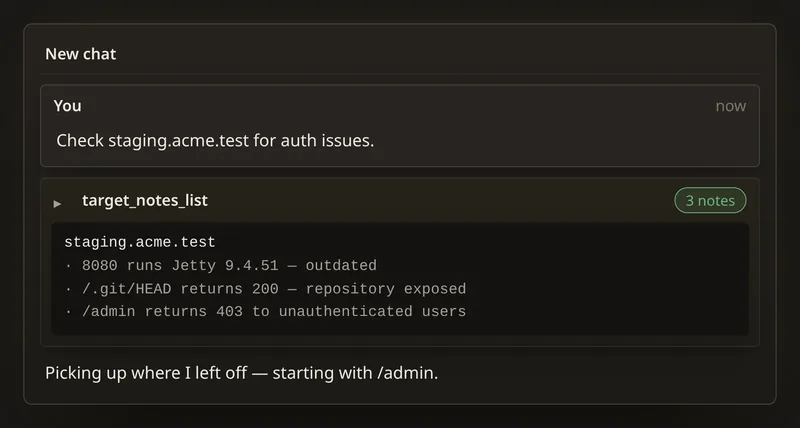
Recon the agent saves about a target carries into later chats, so a new session picks up where the last one left off instead of starting cold.

A new chat where the agent's target_notes_list call returns three saved notes about staging.acme.test.

It reports.

Every finding, written up.

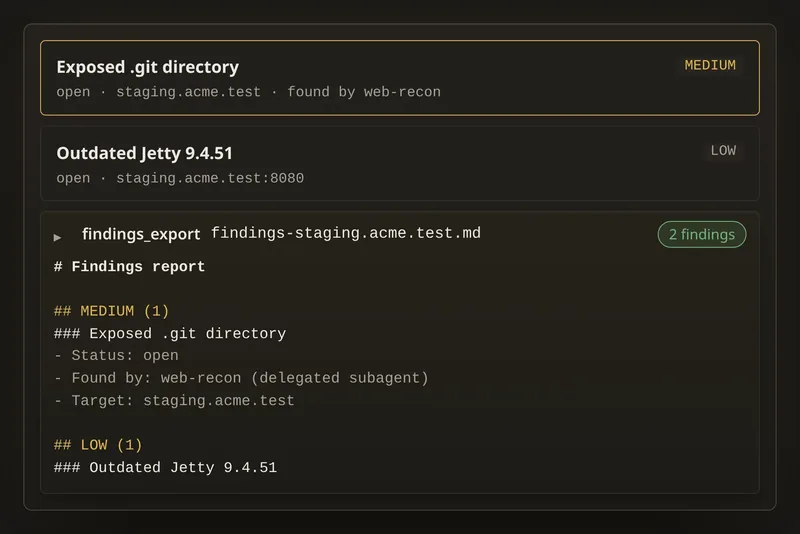
Findings are logged with severity, status, evidence and which subagent found them — and export as a structured report.

A findings panel listing an exposed .git directory as medium and an outdated Jetty as low, with an exported markdown findings report.
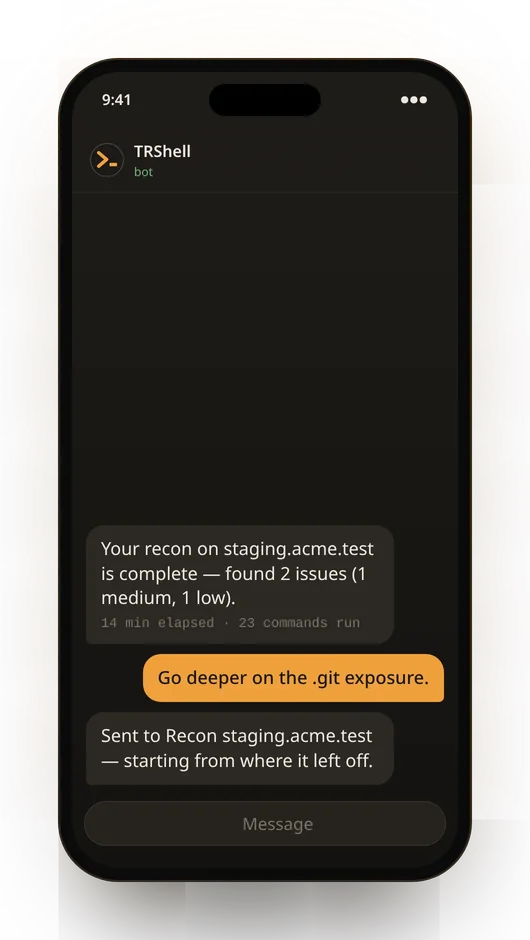
A phone chat with the TRShell bot: the recon on staging.acme.test is complete with 2 issues found; the reply 'Go deeper on the .git exposure' is acknowledged and the session continues.

And it tells your phone.

Get a message on Telegram or Discord when a run finishes, stalls or crashes. Reply to steer the session from wherever you are.

Who it's for

Built by experts to hunt vulnerabilities.

Used by individuals on bug bounties and audits. It plans, runs real tools, delegates, recovers from its own failures and writes the report, so it covers the recon, enumeration, retries, notes and write-up. You keep the judgement calls.

  • Bug bounty hunters

    Cover more of a programme's scope in less time, without stepping outside it.

    • Recon and enumeration run while you dig into the interesting leads
    • Scope warnings before a command touches an out-of-scope host
    • A message on your phone when a run finds something or finishes
  • Pentesters and auditors

    Run the methodical checks every engagement needs, and hand over a report backed by evidence.

    • Findings logged with severity, status and evidence as you go
    • Exports a structured report, so you aren't rebuilding the write-up at the end
    • Target notes carry into the next session instead of starting cold
  • Red teams

    Split one operation across specialist subagents, each with only the access its job needs.

    • Subagents in their own lanes: unrestricted, no deletion or read-only
    • Fixes its own failed commands and breaks out of loops
    • Works over SSH tabs and in a real browser you can watch
  • Security teams and consultancies

    Give every analyst a capable agent that runs on your own machines and your choice of models.

    • Hosted models or fully local with Ollama, so client data stays in-house
    • Per-profile shell access with allow and deny lists
    • Every command and edit is visible, so the work can be reviewed

Also useful for researchers and students learning the craft on labs and CTFs.

See it run on a live target: request a demo

The trailer

Fifty seconds, six acts.

Built for authorised work

You set the guardrails. It stays visible.

  • Nothing hidden

    Every command runs in a tab you can see, and every edit shows as a live diff.

  • Per-agent shell access

    Unrestricted, no deletion or read-only, with allow and deny lists — set separately for every agent profile.

  • Scope warnings

    Declare what's in scope. A command that reaches outside it raises a warning, and the agent checks in with you.

  • Runs on your machine

    The agent's gateway listens on localhost only. Notification bot tokens are encrypted at rest.

  • Memory you approve

    Anything the agent wants to remember long-term waits for your approval before it's saved.

  • Your models

    Use hosted providers or keep everything local with Ollama. Extend it with MCP servers, skills and custom rules.

Worth knowing: the agent runs the commands it writes without stopping to ask each time. The guardrail is the shell access you give each agent — so start with read-only or no-deletion for anything sensitive.

Early access

Use it on your next engagement.

Early access is open to organisations and individuals on Debian-based Linux. Ask for a demo, access or pricing below, and we'll reply within 24 hours.

Request a demo

We'll walk you through a live run: the plan, real commands in the terminal, subagents working in their own lanes, and the findings report at the end. Bring your own questions or use case.

Request a demo

For organisations

Security teams, consultancies and SOCs. Team licences, onboarding, and a direct line for feedback.

Request team access

For individuals

Bug bounty hunters, pentesters, auditors, researchers and students who want an agent in their own terminal.

Request personal access

Send a request

It goes straight to our inbox. We reply within 24 hours.

Bounties, audits, team size, or good days and times for a demo.

Or write directly: trust.oluwasegun@trackedincorp.org